Introduction
Stacks are a Last In First Out (LIFO) type of dynamic array that only gives the user access to the top element. Elements can be placed on top of the stack, and can be removed from the top. Unlike regular dynamic arrays, elements cannot be placed in the middle of the stack.
Pushing and Popping
The functions used for modifying the stack are called push and pop.
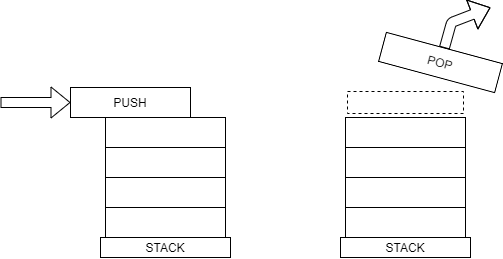
Python uses the append() function for pushing an item to the top of the stack.
stack = []

stack.append(1)
stack.append(2)
stack.append(3)

print(stack)
# [ 1, 2, 3 ]
The pop() function removes the top item and returns its value, allowing you to store the popped value in another variable. In the example below, the values popped from the stack are returned to the print() function and displayed.
print(stack.pop())  # 3
print(stack.pop())  # 2
print(stack.pop())  # 1
Efficiency
Pushing and popping from the stack doesn’t require any shifting of the data in the dynamic array. The top item is only ever accessed, which means modifying the stack has an efficiency of O(1).
Application – Keeping things in order
Stacks are really good at keeping things in order. For example, if you’re writing a document in a word processor and you make a mistake, you can hit Ctrl Z to undo, and that’s because all of your changes are saved on a stack. The editor knows the order of all the actions you performed, so undo-ing an action simply means removing it from the stack.
Another good example of how stacks are used is the CallStack. The CallStack keeps track of the state of the program as functions are called, meaning that the values of the variables within that function’s scope are saved. Take a look at the diagram below, which shows a structure chart for a program. If you want to call Function F, you first have to call Function B and Function D.
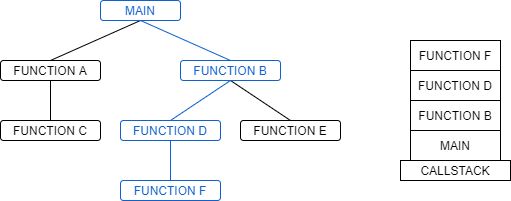
As each function is called, it is added to the CallStack. When a function finishes or returns a value, it pops the top function off the CallStack and reverts to the previous program state. The CallStack comes especially in handy when debugging. If an error occurs in one of your functions, the CallStack can tell you which functions were called in order to reach that point, making it much easier to determine the source of the error.
Practice
Remember that the append (push) function adds an item to the end, and the pop function removes the last item from the end. In the editor below, fill in the rest of the brackets to keep track of the stack after each line.
See the solution!
stack = []

stack.append(1)  # [1]
stack.append(2)  # [1, 2]
stack.append(3)  # [1, 2, 3]
stack.pop()      # [1, 2]
stack.pop()      # [1]
stack.append(4)  # [1, 4]
stack.append(5)  # [1, 4, 5]
stack.pop()      # [1, 4]
stack.append(6)  # [1, 4, 6]
stack.pop()      # [1, 4]
stack.pop()      # [1]
stack.pop()      # []
stack.append(7)  # [7]
stack.append(8)  # [7, 8]
stack.pop()      # [7]
stack.append(9)  # [7, 9]
stack.append(10) # [7, 9, 10]
stack.pop()      # [7, 9]
Problems
1. Reversing items
Time to try stacks out for yourself!
Because items are popped from the stack in the opposite order that they are pushed, stacks can be useful for reversing the order of an array. See if you can finish the Python code below to reverse the phrase using a stack.
See the solution!
phrase = "!looc era serutcurts ataD"
phrase_reversed = ""
stack = []

for letter in phrase:
    stack.append(letter)

while len(stack) > 0:
    last_letter = stack.pop()
    phrase_reversed.append(last_letter)

print(phrase_reversed)
# "Data structures are cool!"
2. Creating a Stack Class
Nice job on that last problem! Using Python’s list works pretty well, but it’s still possible to access items in the middle of the list. Let’s try encapsulating our stack in a class! Try implementing:
- The
pushandpopmethods (You should not be able to pop any elements if the stack is empty. Try to do some error checking!) - A
peekmethod, which will just look at the top item without removing it - An
is_emptymethod, which will return a boolean indicating whether the stack is empty - Any other methods you think would be useful!
See the solution!
class Stack:

    def __init__(self):
        self.stack = []

    def push(self, value):
        self.stack.append(value)

    def pop(self):
        if len(self.stack) > 0:
            return self.stack.pop()

    def peek(self):
        return self.stack[-1]

    def is_empty(self):
        return len(self.stack) == 0

    # Here are some extra functions we can add to our Stack Class!
    def __len__(self):
        return len(self.stack)

    def __str__(self):
        return str(self.stack)

    def clear(self):
        self.stack = []
Keep on learning!
Great job on making it through this lesson! Keep studying data structures and you’ll be stacked with knowledge!
The next lesson is Linked Lists!
Or you can jump to Trees!